|
Product codes
DV-N8
D-Vision
digital video recorder, 8 video inputs and 8 audio inputs (Hard Disk not
included)
DV-ND
DVD burner for DVN video-recorders (optional)
DV-NR
IR remote control for DVN video-recorders (optional)
Futher information
Technical info
Tutorial on video recording technologies
Instruction manual
D-Vision
cards for PC
Prices
Price list
Place an order
How to order
|
|

Stand-alone
D-Vision video recorders with H.264 compression
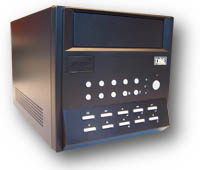
 8 video inputs
8
audio inputs
H.264 Compression
Compatible with all
D-Vision PC cards
Suitable for IExplorer
Linux embedded
D-Vision chip embedded
Takes 2 Hard Disks
704x576 resolution
Monitoring 25 f/sec
recording 12.5 f/sec
TCP/IP port for PC
USB ports for backup
Full triplex
Motion detection
4 alarm I/O
DVD burner (opt.)
Remote control (opt.)
 datasheet
Rear connections

From
left to right: RJ45 ethernet port, 2 USB ports, connections for cameras
(each with an adaptor cable with 4 BNC connectors), on/off switch, VGA
output for monitor, BNC output for analog monitor/TV, 4 connectors for audio
(each with adaptor cable with 4 RCA connectors), terminal board for 4 alarm
inputs + 4 alarm outputs.
Front controls
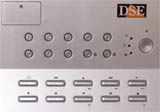
At the top, camera selection buttons, at the bottom
buttons for function control and programming. The device is operated and
programmed using these simple buttons which feature familiar video recorder
terms.
Direct backup via USB
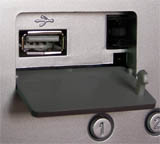
With DV-N videorecorders it is easy
to create a backup of your recordings, even long recording periods, without
the use of a PC. All you need to do is connect a hard disk or USB memory
stick to one of the USB ports and activate the backup function. The
recordings can be viewed using the DV-player available in the
download section of this site, and can also be exported in AVI format.
DVD burner
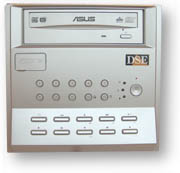
Optional
IR remote control
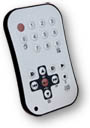
Optional
with stand-alone receiver
Software for remote control
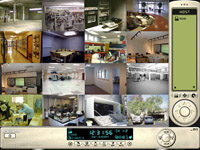
The
D-Vision software supplied enables you to connect DVision N video recorders
and the PC cards D-VisionXP and D-VisionRT simultaneously
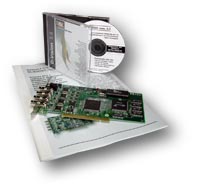
DSE D-Vision cards
enable
you to set up high performance PC-Based video recorders, fully compatible
with stand-alone DV-N16 video recorders.
|
|
If you want to use a video recorder
with your CCTV system, you must first choose what kind of technology you
want to use. There are 4 solutions on the market:
 P.C.
based digital video recorders P.C.
based digital video recorders

Stand-alone
digital video recorders with static compression
Stand-alone
digital video recorders with dynamic compression
(on
this page)
If you want to explore the detailed pros and cons of the various types, you
can read the tutorial on
video recording
technologies. DSE offers state of the art products of each different
type of technology
Why buy a DSE stand-alone video recorder?
 EASY
TO USE EASY
TO USE
D-Vision digital video recorders offer all the power of the PC-based
D-Vision system, with the simplicity
of a video cassette recorder. Extremely easy to use, even by untrained
staff.
POWERFUL
8/16 video channels, 8/16 audio channels, hardware H-264 super compression,
705x576 high resolution, remote control from any station. Complete
compatibility with remote connection to D-Vision PC-based systems.
COMBINE
PC TECHNOLOGY WITH STAND ALONE SIMPLICITY
DSE DVRs are the ideal solution for those who want the compression power of
a PC but without opting for an entirely PC-based system like the
D-Vision cards. This appliance is simple to use,
with its own controls and without requiring a keyboard or mouse. It can be
connected directly to an analog monitor or TV. Just like a home video
recorder.
Main features
Versions available
D-Vision stand alone DVRs are available for 8
cameras.
DV-N8
- 8 video inputs + 8 audio inputs
D-Vision + embedded
LINUX
With its embedded LINUX operating system and powerful D-Vision H.264
compression chips, DVision-N video recorders deliver the same performance as
a PC-based video recording system, while still being completely independent
and able to function without any external devices.
H.264 Compression, 704x576 resolution
DSE DV-N video recorders use the powerful compression chip H.264 (MPEG Part
10), the state of the art in digital video compression, which delivers the
utmost in ultra compression without affecting image quality. Compared to the
previous versions of MPEG4 technology, H.264 compression eliminates the ‘pixelated
effect’. The powerful compression technology means being able to capture
high resolution video (704x576 pixels) without occupying a huge amount of
hard disk space.
Lengthy recording times
H.264 compression enables you to record for long periods onto a normal hard
disk . .
To guarantee maximum flexibility, DSE video recorders are supplied without a
hard disk. You can insert a maximum of 2
SATA or PATA hard disks
of any capacity in order to tailor recording capacity to meet your
needs. The hard disk does not need to be formatted as it is recognized by
the device when turned on, and automatically formatted with a Linux EXT3
file system. The disk space occupied by the recordings depends on the
recording parameters and amount of movement which occurs. To get an idea of
this, with 16 cameras set to record continuously, a 160 Gb hard disk can
store an average of 7-10 days uninterrupted recording. You can fit up to 2
hard disks with a larger capacity (250...300 Gb) to increase recording
capacity. When all the disk space is used up the device continues to record,
automatically overwriting the oldest images.
Smooth “jerk-free” images
DVision-N video recorders deliver a smooth flow of images without the jerky
effect which is typical with VCRs or cheap digital systems. The images are
viewed at a rate of 25 frames/second (real-time). The total capture rate
when recording is 100 f/sec (DV-N8), distributed
between the channels recording.
Mouse control
DVision-N DVRs can be controlled with a PS2 mouse without using the front keypad.
Access from remote PC via LAN or internet
One key strength of the D-Vision N system is its advanced networking
capacity. The rear Ethernet port means you can connect the DVR directly to a
LAN network to enable remote viewing of images on any PC in the network, or
via the internet (with the D-Vision software supplied). DV-N video recorders
are unique in that they are enabled to handle the
PPPoE protocol, and can be directly connected to an ADSL modem
without a PC, network or router.
Advanced network functions
D-Vision N video recorders stand out for their high level
networking functions. A DV-N can be monitored simultaneously from more than
one PC, and more than one PC can be used to display images from various
video recorders. H.264 compression enables multiple streaming with minimum
use of band width.
Compatibility with D-VisionXP and RT cards
D-Vision remote access software is also used for connecting up to
D-Vision PC cards, and it is therefore possible to create systems
comprising DV-N video recorders and PCs with
D-Vision cards which can work together, and all be monitored from
one or more control stations.
Connection with Internet Explorer
As well as
connecting by means of D-Vision software you can also use
Internet Explorer
to view images in real time.
DDNS support
The DV-N video-recorders support all major DDNS providers. Remote
access through the Internet will be easy even if your ISP cannot provide you
a static IP address.
Full
Triplex
Recording continues even during playback and/or access from remote PC.
Motion
detection
The Motion Detection function, which has a sophisticated
programming system for each individual camera, enables recording to be
activated only in the event of an intrusion, meaning there is no need to
take up space on the hard disk unnecessarily.
Audio
DV-N video recorders have an individual audio input for each
camera for connecting to cameras with audio.
Back up
function
Unlike stand-alone video recorders without an operating system,
like the DSE models in the DR range, DV-N video recorders save recordings in
a format which can be handled by a PC, and this makes file management and
copying much simpler. The files, which are saved into handy files divided by
date and camera, can be copied or burned onto disc from any remote PC. The
video recorder itself enables you to perform a manual back up of the files
onto a hardware connected to its USB ports.
The connections
8(DV-N8)
VIDEO INPUTS –
Up to 16
cameras can be directly hooked up to the BNC connectors on the device,
without using a quad-splitter or multiplexer
8(DV-N8)
AUDIO
INPUTS -
Individual
audio input for each camera
ANALOG
MONITOR OUTPUT - Video output to connect directly to a
CCTV monitor or normal television.
VGA
MONITOR OUTPUT -
VGA output
to connect to a Personal Computer monitor
4
ALARM INPUTS to connect burglar alarm sensors
4
ALARM RELAY OUTPUTS
to activate external devices. These outputs can be automatically controlled
when an alarm is activated (by an external sensor or motion detection) or
manually controlled, including from a remote PC
NETWORK
CARD
built-in, with RJ45 connector for LAN connection. Built-in PPPoE
support for direct connection to ADSL modem
1
or 2 HARD DISKS
- 7200 rpm – of any size (not included). No advance formatting
required
3
USB PORTS
to connect external media for back-up or firmware updates (2 rear, one
front)
Options
DVD BURNER –
 Order
this item if you wish your DV-N8
be equipped with built-in DVD recorder.
DVD recorder is ideal for backing-up your videos quickly without connecting
PC or other devices. Use the DV-Player (included in the CD) to
playback your videos. Order
this item if you wish your DV-N8
be equipped with built-in DVD recorder.
DVD recorder is ideal for backing-up your videos quickly without connecting
PC or other devices. Use the DV-Player (included in the CD) to
playback your videos.
IR Remote control –
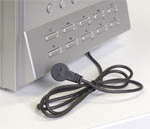 Order
this item if you wish your DV-N8 be equipped with built-in IR remote control.
Remote control allows all control operations availbale on the front panel.
Unlike most DVR's on the market the DV-N remote control has a separate receiver head that is connected by wires to the DVR.
This is useful if you wish to install the DVR inside a protection cabinet controlling all functions from outside.
. Order
this item if you wish your DV-N8 be equipped with built-in IR remote control.
Remote control allows all control operations availbale on the front panel.
Unlike most DVR's on the market the DV-N remote control has a separate receiver head that is connected by wires to the DVR.
This is useful if you wish to install the DVR inside a protection cabinet controlling all functions from outside.
.
The main functions
FULL
SCREEN VIEWING, MULTIVISION 4/8/16 WINDOWS, SEQUENTIAL SCAN – Great
viewing flexibility for all cameras
CAMERA
TITLE, DATE AND TIME DISPLAYED –
Can be
programmed for each individual camera
VIDEO
SETTINGS -
Luminosity, contrast, saturation, tones (for each individual camera)
SLOW
MOTION AND FAST PLAYBACK - Slow motion up to 1/8th of normal speed. Fast
playback up to 8x. Frame-by-frame viewing
PICTURE
IN PICTURE (PIP) – During playback, without stopping recording, the PIP
function enables you to view recorded and real time images simultaneously on
screen
RECORDING
– CONTINUOUS, PROGRAMMED OR ALARM-TRIGGERED –
You
can record at set times or only when triggered by an alarm event generated
by external sensors or the motion detection system
MOTION
DETECTION –
The motion
analysis function enables you to activate recording when the image changes.
4 masking areas can be programmed for each camera
PRE-ALARM
RECORDING –
You
can set the system to record a period of 3/5 seconds prior to each alarm
event
AUDIO
–
Synchronized audio recording for each camera with live playback also from
remote PC
REMOTE
CONTROL – You can connect the device directly to a PC, a LAN network, router
or even ADSL modem. Real time viewing and recording search from all PCs in
the network or via the internet. Remote control of relay outputs
PASSWORD
PROTECTED –
Up to 4
remote users with programmable levels of access. 1 local user as supervisor
ALARM
FOR VIDEO SIGNAL LOSS – It is possible to set an alarm in the event of
loss of video signal
ARCHIVE
OF ALARM EVENTS
All alarm
events, whether triggered by sensors, motion detection or video signal loss,
are logged in an easy-to-access file, and recordings can be viewed directly
D-VISION
SOFTWARE FOR CONTROL FROM PC -
D-Vision
software included for remote access, also compatible with D-Vision PC cards
BACK-UP
FUNCTION –
Manual
back-up option for video files, onto external media via USB port
(Hard Disk, SD card, USB memory stick etc.) or built-in DVD burner
Further information
datasheet
|